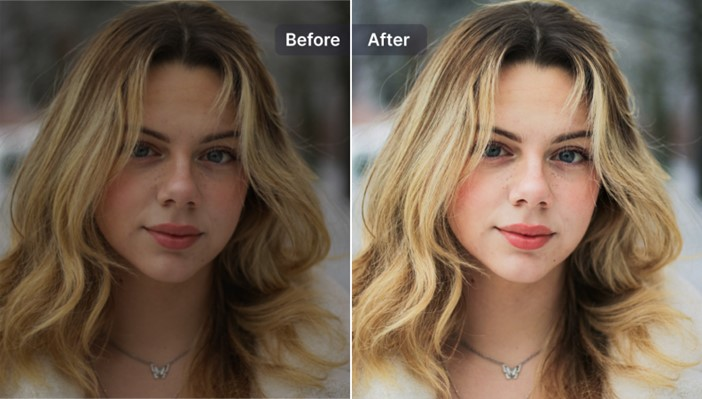
How to Upscale and Enhance Images Without Photoshop
In today’s digital world, image quality matters more than ever. Whether you’re posting on social media, running an online store, or working on personal creative projects, high-quality visuals can significantly boost engagement and leave a lasting impression.
The good news is that improving image quality is no longer limited to professional designers. Thanks to modern AI-powered tools, anyone can now enhance photo quality quickly and effortlessly—no advanced skills required.
Part 1. What Is Image Quality Enhancement?
Image quality enhancement refers to improving the visual clarity and overall appearance of a photo. People often look to fix common issues such as:
- Blurry or slightly unfocused images
- Low-resolution pictures with visible pixelation
- Grainy visuals caused by digital noise
- Poor lighting, faded colors, or weak contrast
Key Concepts to Know
Photo Editing vs. Image Enhancement
Photo editing focuses on creative changes like filters, cropping, and effects. In contrast, enhancement is about improving the technical quality of an image—making it sharper, clearer, and more detailed.
Manual Editing vs. AI Enhancement
Traditional editing requires time, practice, and expertise. AI-powered tools, on the other hand, automate the process, allowing users to enhance photo quality in just a few clicks with consistent and reliable results.
Modern solutions are designed to simplify these tasks, making it easier than ever for beginners to learn how to enhance photo quality without needing professional training.
Part 2. Why Photoshop Isn’t Ideal for Beginners
While Adobe Photoshop is a powerful and industry-standard tool, it’s not always the best choice for beginners. Here’s why:
- Complex Interface: Photoshop offers a vast range of tools that can overwhelm new users.
- Steep Learning Curve: Mastering it takes time and practice.
- Time-Consuming: Manual adjustments require patience and attention to detail.
- Not Beginner-Friendly: It’s not ideal for users who want quick and simple results.
Photoshop remains an excellent option for professionals, but for those who simply want to enhance photo quality online or offline with minimal effort, there are much easier alternatives available.
Part 3. Simple Ways to Improve Image Quality Without Photoshop
There are several beginner-friendly methods to improve your photos without relying on complex software.
Method 1. Online Image Enhancement Tools
Online tools are one of the easiest ways to get started.
Pros:
- No installation required
- Accessible from any device
- Quick and convenient
Cons:
- Limited customization options
- Quality may vary
- File size or resolution restrictions
They’re useful if you need to quickly enhance photo quality online, but may not deliver professional-grade results.
Method 2. Built-In Editing Tools (Mobile & Desktop)
Most smartphones and computers come with basic editing features.
Best for:
- Adjusting brightness and contrast
- Cropping and resizing
- Applying simple filters
However, these tools lack advanced capabilities, especially when it comes to fixing blur or restoring details. If you’re wondering how to enhance a blurry photo, built-in tools usually won’t be enough.
Method 3. AI Image Enhancers (Best for Beginners)
AI-powered image enhancers are currently the most effective and user-friendly option.
Key benefits:
- Automatically improve clarity and sharpness
- Reduce noise and fix blur
- Restore lost details
- Upscale resolution without quality loss
These tools are ideal for anyone looking to quickly learn how to enhance photo quality with minimal effort and maximum results.
Part 4. Improve Images Easily with Leawo Image Enhancer
4.1 Overview
Leawo Photo Enhancer is a powerful AI-driven desktop tool designed to simplify the entire enhancement process. Built with advanced algorithms, it can upscale images, sharpen details, and improve overall quality automatically.
Another related tool, Leawo PhotoIns, also offers streamlined editing features with a focus on simplicity and automation.
4.2 Beginner-Friendly Features
Leawo Photo Enhancer stands out because of its ease of use and intelligent design:
- AI-powered enhancement technology
- Clean and intuitive interface
- One-click improvement process
- Minimal setup required
These features make it an excellent choice for beginners who want professional-quality results without complexity.
4.3 Step-by-Step Guide
Using the software is simple and straightforward:
- Open the program
- Upload your image
- Select an enhancement option
- Let the AI process the image
- Export the improved version
With just a few clicks, you can significantly enhance photo quality and transform even low-resolution or blurry images into clear, high-quality visuals.
Conclusion
Improving image quality no longer requires complicated tools or professional expertise. While Photoshop remains a powerful option, it’s not always the most practical choice for beginners.
Today, AI-based solutions provide a faster, easier, and more accessible way to enhance images. Tools like Leawo Photo Enhancer make it possible for anyone to achieve impressive results with minimal effort—whether you’re fixing blur, increasing resolution, or simply making your photos look their best.